Installation Engineer Manual
This guide explains how to configure ClimateSync Auto Mode using the ClimateSync Configuration Tool.
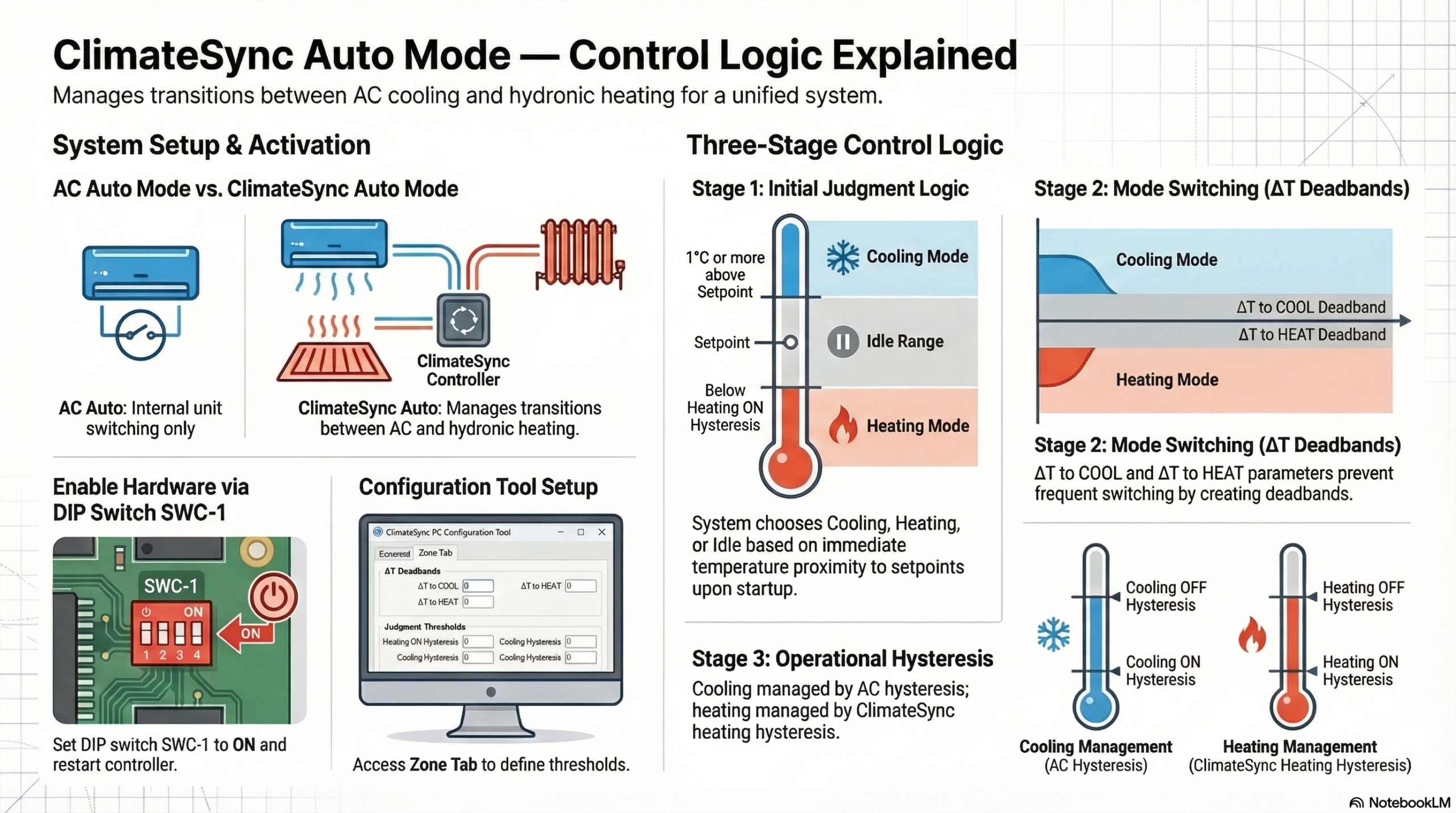
ClimateSync Auto Mode allows the controller to automatically select between cooling and hydronic heating based on the room temperature relative to the setpoint.
Before configuring the system, installers must understand the difference between the two Auto modes available in a ClimateSync system.
1.1 AC Auto Mode
AC Auto Mode is controlled entirely by the air-conditioning system.
In this mode the AC unit automatically switches between:
ClimateSync does not control the heating technology in this mode.
This mode is normally used when both heating and cooling are provided by the air-conditioning system.
1.2 ClimateSync Auto Mode
ClimateSync Auto Mode is controlled by the ClimateSync controller.
In this mode the system operates using:
Instead of switching between AC cooling and AC heating, ClimateSync switches between:
Cooling → Air-conditioning system
Heating → Hydronic heating (UFH or radiators)
This configuration is typically used when:
ClimateSync Auto Mode must first be enabled on the controller hardware.
Step 1 – Locate DIP Switch SWC-1
On the ClimateSync controller PCB, locate the DIP switch block SWC.
Step 2 – Set DIP Switch SWC-1 to ON
Set:
SWC-1 = ON
This enables ClimateSync Auto Mode functionality.
Step 3 – Restart the Controller
After changing the DIP switch setting:
After restart, ClimateSync Auto Mode will become available in the Configuration Tool.
Each zone has its own configuration section.
Within each Zone Tab, locate the section titled:
ClimateSync Auto Mode
The following parameters will be visible:
These parameters determine how the controller selects heating or cooling operation.
When either a zone is:
ClimateSync must decide whether to start in:
The controller performs an initial judgment instead of waiting for the ΔT thresholds.
5.1 Cooling Judgment
If the room temperature is:
1°C or more above the setpoint
ClimateSync will immediately start the zone in:
Cooling Mode
Once cooling mode has started, the zone will remain in cooling mode until the ΔT to HEAT threshold is reached.
5.2 Heating Judgment
If the temperature is sufficiently below the heating threshold, the system will start in:
Heating Mode
The exact point at which heating starts is determined by the parameter:
Judgment to Heat below ON hysteresis
Example:
If the value is set to 0.1°C, heating will start when the room temperature drops 0.1°C below the heating ON hysteresis threshold.
5.3 Idle Range
If the room temperature is between the cooling judgment threshold and the heating judgment threshold:
The system will remain Idle.
The controller will wait until either:
before activating the system.
Once the initial mode has been selected, the ΔT parameters control when the system switches between heating and cooling modes.
6.1 ΔT to COOL (Changeover Deadband)
This parameter defines when the system switches from Heating Mode to Cooling Mode.
Example:
Setpoint = 23°C
ΔT to COOL = 3°C
Cooling mode will be activated when the room temperature reaches:
26°C
6.2 ΔT to HEAT (Changeover Deadband)
This parameter defines when the system switches from Cooling Mode to Heating Mode.
The ΔT values create a deadband around the setpoint, preventing frequent switching between heating and cooling.
It is important to understand that the ΔT parameters only control mode switching.
They do not control when the system turns on or off.
7.1 Cooling Operation
Once the system is in Cooling Mode, the ON/OFF operation is controlled by:
The air-conditioning system hysteresis
The AC unit decides when to start and stop cooling.
7.2 Heating Operation
Once the system is in Heating Mode, the ON/OFF operation is controlled by:
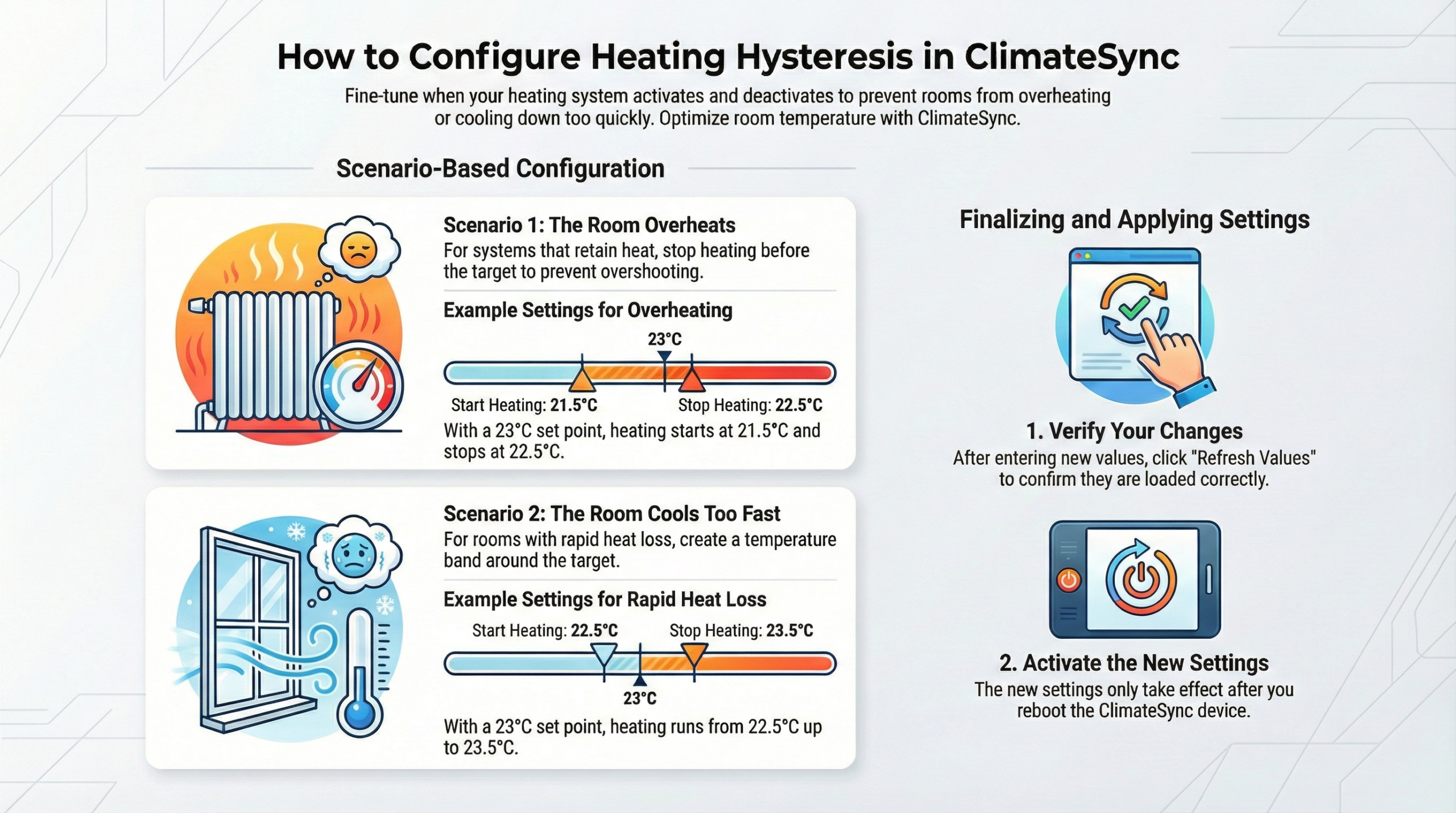
ClimateSync heating hysteresis
This hysteresis determines when the underfloor heating or radiators are activated.
All Auto Mode parameters are configured individually for each zone.
Each zone may require different values depending on:
Adjust parameters accordingly for each zone.
Example system configuration:
Setpoint: 23°C
Room Temp: 23°C
Parameters:
ΔT to COOL = 3°C
ΔT to HEAT = 3°C
Judgment to Heat below ON hysteresis = 0.1°C
System behaviour:
This configuration ensures stable operation without rapid switching.
ClimateSync Auto Mode operates in three stages:
Determines whether the zone starts in:
Cooling
Heating
or Idle
Controlled by:
ΔT to COOL
ΔT to HEAT
Cooling ON/OFF → controlled by AC system
Heating ON/OFF → controlled by ClimateSync heating hysteresis
Installation Engineer Manual
This guide explains how to configure the Boiler Delay Time parameter in a ClimateSync system using the ClimateSync Configuration Tool.
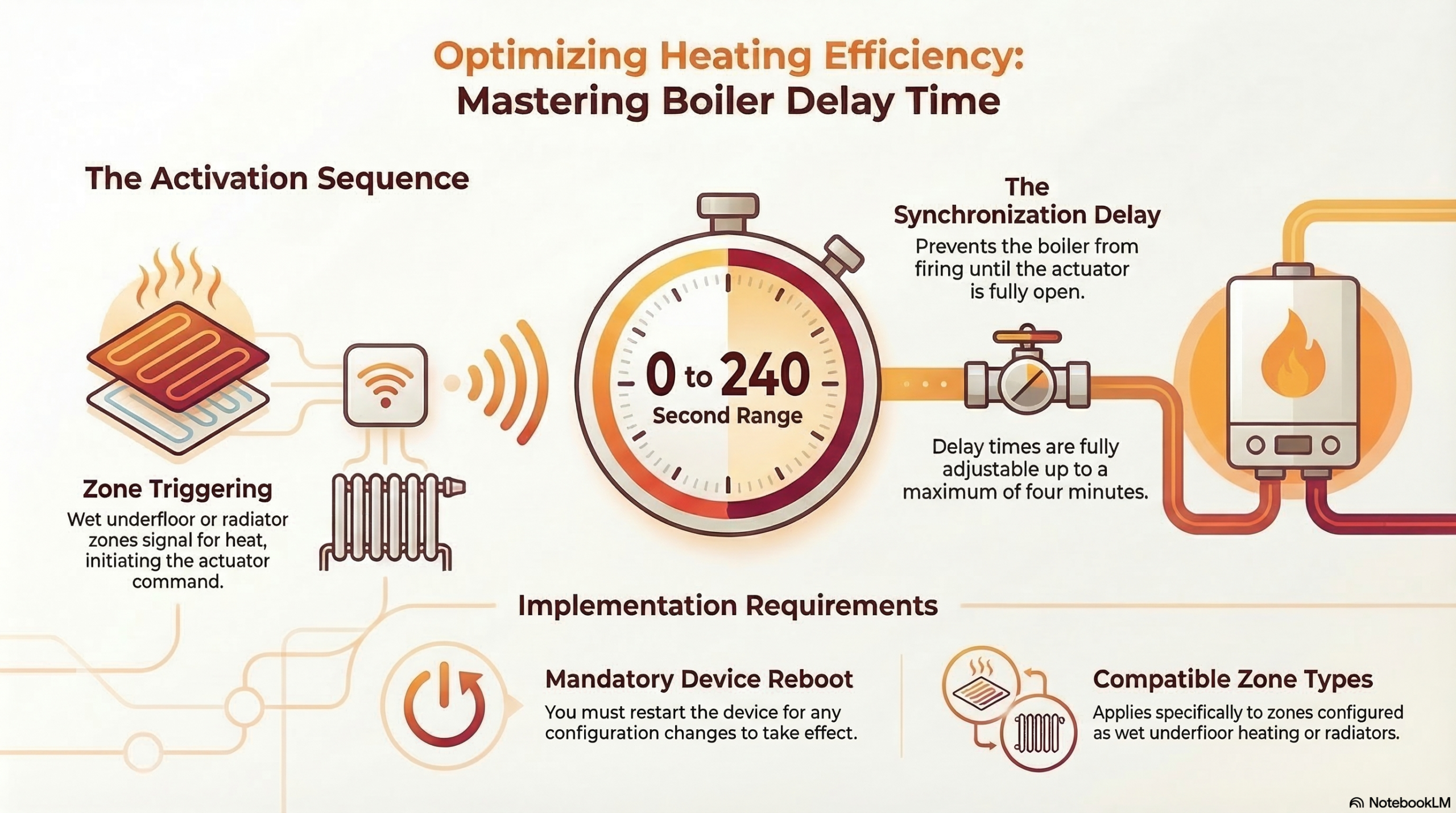
The Boiler Delay function is used to protect the boiler and improve system stability by delaying the boiler activation when heating demand begins.
In hydronic heating systems, such as underfloor heating or radiator systems, it is often undesirable for the boiler to start immediately when a heating zone requests heat.
The Boiler Delay Time allows the system to wait for a defined period before activating the boiler.
This provides several advantages:
The Boiler Delay function is active when the ClimateSync system controls:
The delay is applied when:
Instead of immediately activating the boiler, the system waits for the configured delay time.
The Boiler Delay Time is configured using the ClimateSync Configuration Tool.
Step 1 – Connect to the Controller
Step 2 – Navigate to the Common Settings
Locate the Boiler Delay Time section .
Within this section you will find the setting:
The Boiler Delay Time defines how long ClimateSync waits before sending the command to start the boiler.
Configuration Steps
The value is typically defined in seconds (0-240).
When a heating zone requests heat, the following sequence occurs:
This ensures that the heating circuit is ready before the boiler begins producing heat.
Recommended values may vary depending on system design.
Typical delay values include:
System Type | Typical Delay |
Small radiator systems | 30–60 seconds |
Underfloor heating systems | 60–180 seconds |
Large multi-zone systems | 2–5 minutes |
These values help prevent unnecessary boiler cycling.
Example configuration:
Boiler Delay Time = 120 seconds
Sequence:
The boiler will now begin heating the system.
If multiple zones request heating:
This ensures stable system operation.
Installation engineers should ensure:
Improper delay configuration may cause:
After configuring the boiler delay time:
Confirm that system operation matches the intended sequence.
The Boiler Delay Time ensures that:
Correct configuration of this parameter is essential for stable hydronic heating operation.
Key Concept
ClimateSync Heating Modes:
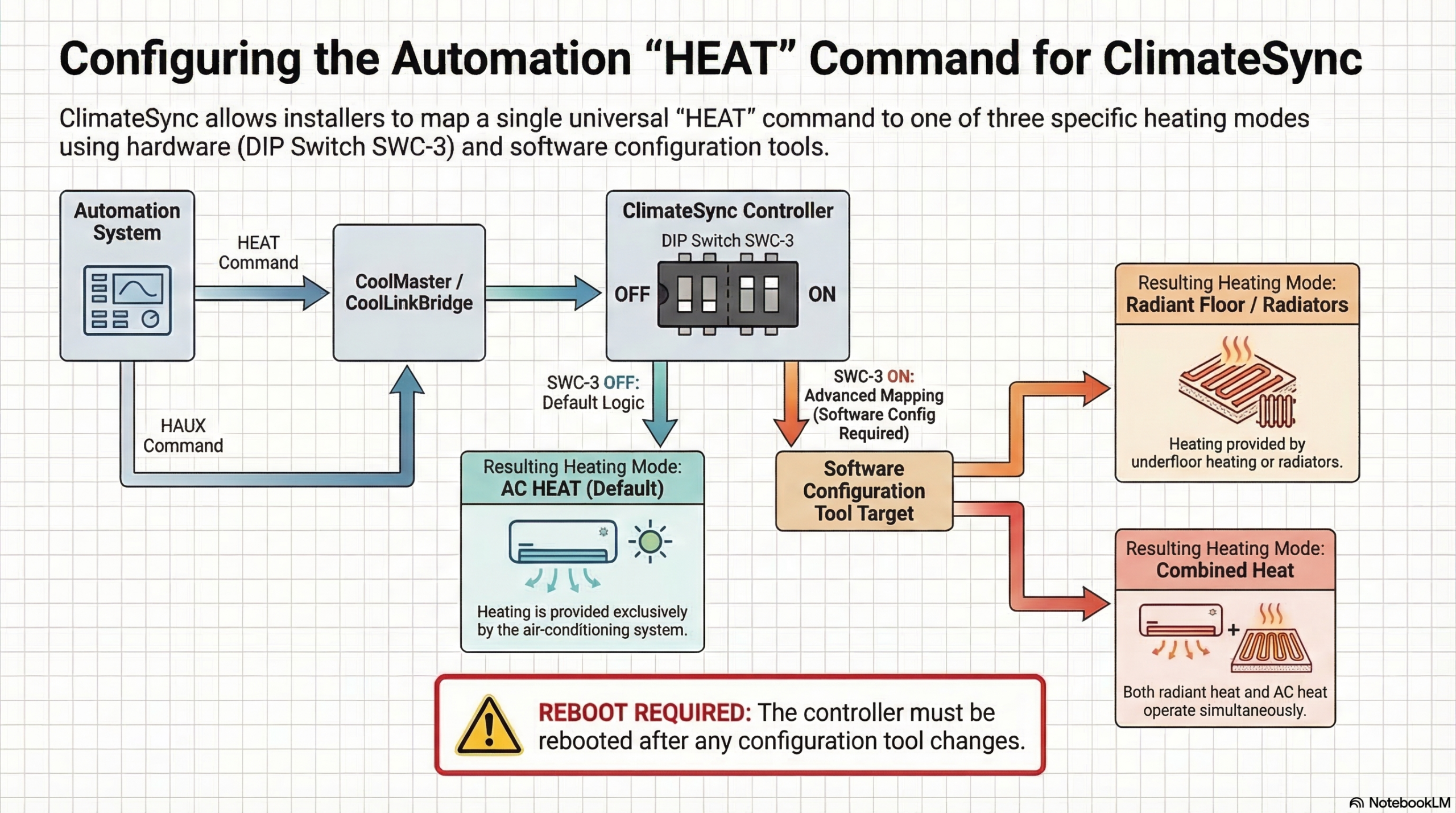
Automation systems sometimes only have one heat command (“HEAT”).
ClimateSync supports three different heating modes, and installers must understand which one will be triggered.
Default Behaviour
By default, when an Automation system sends a HEAT command via CoolMaster / CoolLinkBridge, ClimateSync triggers:
AC HEAT mode
DIP Switch Behaviour
When DIP Switch SWC-3 = OFF
Note:
Whether the radiant heating is underfloor heating or radiator depends on zone configuration settings, which are explained separately.
When DIP Switch SWC-3 = ON
The system behaviour changes:
At this point the installer can configure what the HEAT command should do.
Configuration Tool Setting
Using the ClimateSync Configuration Tool:
Go to:
Common Tab → Automation Heat Command Target
A dropdown allows the installer to select:
1️⃣ Radiant Heat / Radiator
→ HEAT command activates UFH or radiator heating
2️⃣ Combined Heat (HH Mode)
→ HEAT command activates both radiant heating and AC heating together
Important Step
After changing this configuration:
⚠️ The ClimateSync controller must be rebooted for the new setting to take effect.